average#
- iris.sg.background.average(obs, axis)[source]#
Compute the average along the given axis using
numpy.nanmedian()- Parameters:
obs (SpectrographObservation) – The observation to be averaged.
axis (str | tuple[str, ...]) – The logical axis along which to take the average.
- Return type:
Examples
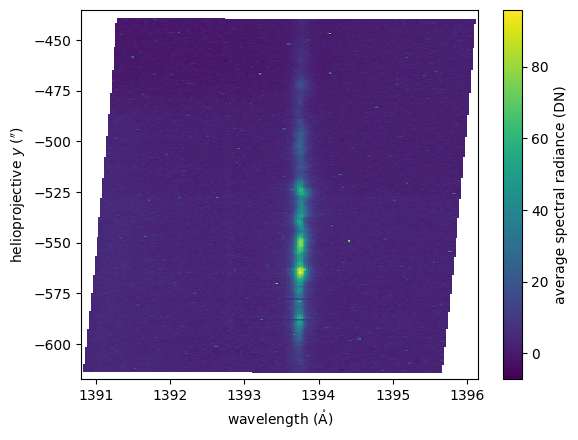
Download an IRIS spectrograph observation and compute the average along the raster average.
import matplotlib.pyplot as plt
import astropy.visualization
import named_arrays as na
import iris

# Load a spectrograph observation
obs = iris.sg.SpectrographObservation.from_time_range(
    time_start=astropy.time.Time("2021-09-23T06:00"),
    time_stop=astropy.time.Time("2021-09-23T07:00"),
)

# Save the time and raster axes
axis = (obs.axis_time, obs.axis_detector_x)

# Compute the average along the time and raster axes
avg = iris.sg.background.average(
    obs=obs,
    axis=axis,
)

# Plot the result
with astropy.visualization.quantity_support():
    fig, ax = plt.subplots()
    img = na.plt.pcolormesh(
        avg.inputs.wavelength,
        avg.inputs.position.y,
        C=avg.outputs.value,
    )
    ax.set_xlabel(f"wavelength ({ax.get_xlabel()})")
    ax.set_ylabel(f"helioprojective $y$ ({ax.get_ylabel()})")
    fig.colorbar(
        mappable=img.ndarray.item(),
        ax=ax,
        label=f"average spectral radiance ({obs.outputs.unit})",
    )